
These days, a LinkedIn post generator can transform the way you communicate.
Posting on LinkedIn is no longer an option, it's a strategy.
But between lack of inspiration, time constraints and irregularity, many give up quickly. 😔
From there, tools were born, with the aim of helping you find content ideas, write faster and, above all, publish regularly.
In this article, we'll take a look at :
Why it's essential to publish regularly on LinkedIn.
How a LinkedIn content generator can really save you time.
How Kawaak supports you every step of the way.
Ready to get your strategy off the ground? 🚀 (Reading time: 3 minutes).
Why publish regularly on LinkedIn?
Posting on LinkedIn isn't just about "making a presence".
It's about building visibility, developing a relationship of trust with your network and, above all, asserting your expertise. 💪🏼
But that's not all, and that's what we're going to find out right now. 👇🏼
1) Develop your personal brand
Your LinkedIn profile is more than an online CV, it's your professional showcase.
By regularly publishing impactful and relevant content, people will quickly understand that you're an expert in your field, and will have confidence in you and what you say.
Be patient, because a is built over time. Each post must be consistent from :
Tone.
Subject.
Positioning.
Graphics.
This will make it easier for your audience to identify, follow and even recommend you. 😇
Psshit, when your readers think of a topic you're used to talking about, they'll think of you.
And that opens the door to opportunities (customers, partnerships, recruitment). 🤩
2) LinkedIn's algorithm favors regularity
LinkedIn works with an algorithm that favors engagement and consistency.
Put simply, the more regularly you post, the more likely your content is to be featured. 😇
I'm not asking you to publish every day, but 1-2 times a week is enough.
By doing so, LinkedIn sees your account as active and relevant, and thus increases the reach of your posts.
Why use a LinkedIn post generator?
Between your to-do list, your meetings, and the famous "what am I talking about this week?" question, it's easy to let your strategy fall by the wayside.
And that's where... drum roll... comes in. 🥁, a LinkedIn post generator!
It doesn't replace your ideas or your style, but it does help you take action faster, more often and, above all, with less stress. 🧘🏼
1) Save time and reduce mental workload
Writing a good post isn't just 3 sentences. No, it's about :
Find an idea.
Formulate it clearly.
Capture attention.
Find a catchphrase.
Structure and create content.
Often, it's this step that makes you procrastinate again and again...
A generator will find you topic ideas, help you formulate your thoughts, and save you time.
Writing a good post isn't just about typing three sentences. You have to find an idea, formulate it clearly, capture attention, structure it... And often, that's what makes you put off the exercise again and again.
2) Find ideas fast with AI
Fear of the blank page? I think we've all been there.
A good post generator (like Kawaak 🤭) will give you topic ideas tailored to your business, your image and your audience.
So yes, AI can't replace your ideas and creativity, but with the right LinkedIn post prompts, you can make it your best ally. 🤖
Let's take a look at how. ⬇️
How to generate a LinkedIn post with Kawaak?
The beauty of a LinkedIn post generator like Kawaak is that it doesn't simply write for you.
It's about helping you publish better and more simply, guiding you every step of the way. 🔢
There are 5 steps to creating a post:
1️⃣ Subject.
2️⃣ Teasers.
3️⃣ Personalization.
4️⃣ Posts.
5️⃣ Publish.
We'll quickly show you how. 👇🏼
1) Find a topic relevant to your audience
This is often where we get stuck, often asking ourselves "what am I talking about this week? 🤔".
Well, with Kawaak, you no longer need to search for hours for the perfect idea.
This free tool is directly linked to your LinkedIn, allowing it to understand who you are and what content you like.
Then, in your profile, you can enter information such as :
🟤 What kind of writing do you prefer?
🟤 How do you address others?
🟤 Your publication goals / week.
🟤 Your favorite topics.
With all this information, it will suggest several topic ideas based on your information.
And if you're in a hurry, the tool offers 3 auto-generated posts every day. You don't have to do a thing, just publish. 👀

Once you've chosen your topic, it's time to write! And here again, Kawaak saves you a lot of time. ⏰
Let's start with step 1, and I'll let myself be guided by an idea for a topic generated.

2) Choose your hook
Step 2 consists in selecting a tagline generated directly by Kawaak.

3) Personalize your LinkedIn post
Step 3 is, in my opinion, the most important. It's the one where you add your personal touch. ✨

Don't hesitate to spend a little more time at this stage. The more information you provide, the more impactful and personal your post will be. 😇
4) Choose your favorite post
Once you've added your personal touch, Kawaak will generate several post ideas based on the storytelling of 4 :
Benoit Dubos ⭢ conceptual and informative.
Simon Sinek ⭢ simple and inspiring.
Justin Welsh ⭢ concise and direct.
Dave Gerhardt ⭢ incisive and creative.

If ever, you can always generate more using the little button at bottom left "I want more". ✨
All that's left to do is edit the text if necessary and program your post (we'll explain how right away) 👇🏼.
How to schedule your LinkedIn post with Kawaak?
To schedule your LinkedIn post with Kawaak, you have two options:
You go through the Kawaak post generator and schedule your post in the last step.
You already have your post and use Kawaak as your content planner.
1️⃣ The last step in creating your LinkedIn post is programming!

Check that you're happy with the post and then click on "Publish" or "Schedule". 😇
2️⃣ If you already have your post, you can go to the "My posts" tab and press "Write a post".

Then all you have to do is program your post. 📆
How do I analyze my LinkedIn posts on Kawaak?
Publishing regularly is good. Understanding what works to progress is better. 👀
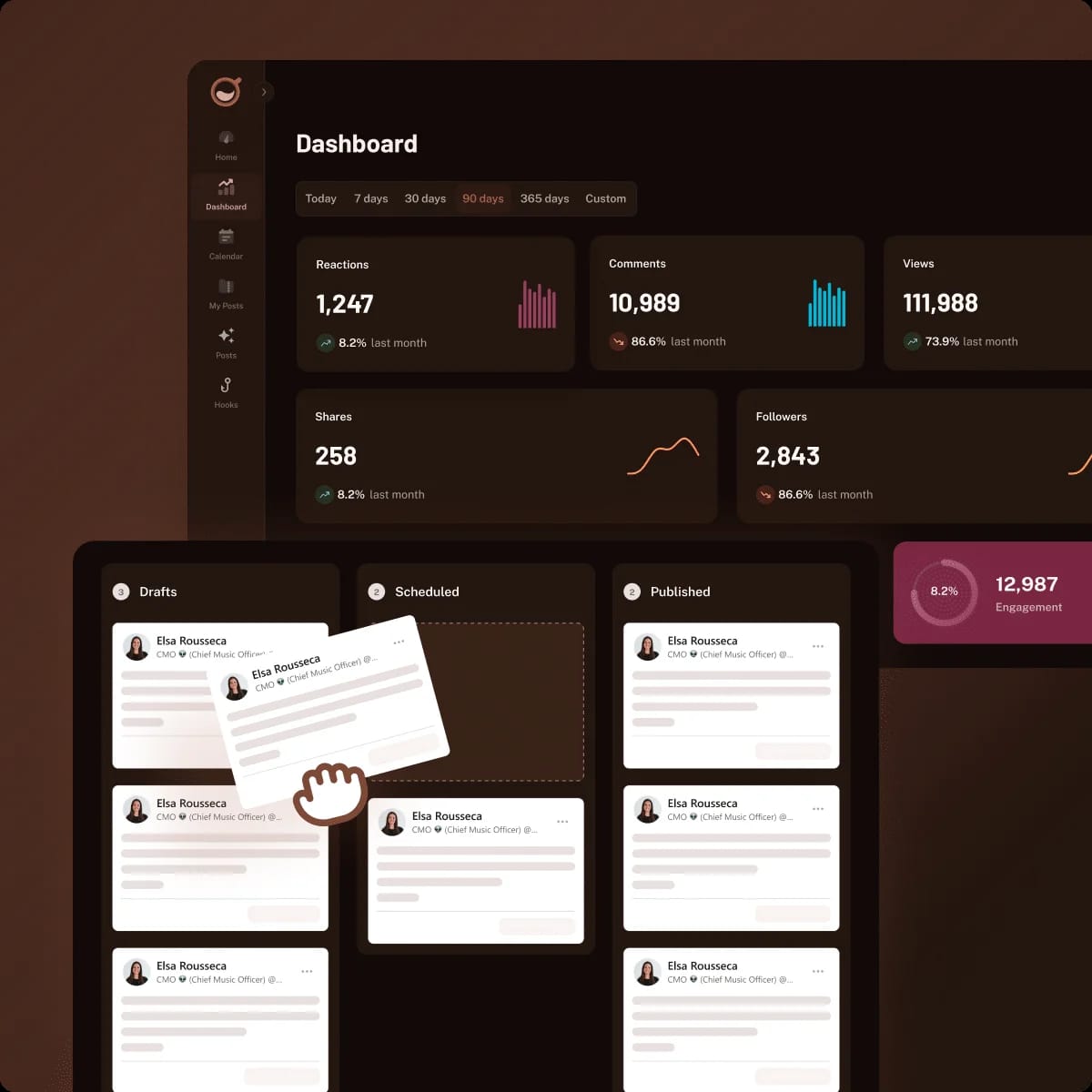
Kawaak not only helps you write and program your posts, it also offers analysis of your performance. 📊

On your dashboard, you will find the following statistics:
Views.
Reactions.
Comments.
Subscribers.
Reposts.
Scope.
Commitment.
The aim of the analysis is not to drown you in numbers, but rather to ask the following questions:
Are my storytelling posts generating more interactions?
Which topics attract the most reactions in my network?
How about a recap?
Just a few months ago, you might have been looking at LinkedIn from a distance. The idea of spending hours researching a topic, structuring a post, choosing the right time to publish, wasn't your priority.
Thanks to a LinkedIn content generator like Kawaak, you can :
Save time.
Structure your ideas.
Schedule your posts.
The real question now is no longer "should I post on LinkedIn?", but rather "what am I going to post tomorrow? 🤔".
Frequently asked questions
How to find LinkedIn post ideas?
To find LinkedIn post ideas, you can :
Draw on your day-to-day experience: feedback, failures, successes, behind-the-scenes stories, passions.
Answer your customers' or prospects' frequently asked questions.
Bounce back on current events in your field of activity.
Can you program your LinkedIn posts for free?
Yes, some tools offer free programming, but with limitations. LinkedIn, for example, offers programming, but without an editorial calendar or editorial support.
Kawaak, on the other hand, will not only schedule your posts, but also generate, structure and analyze them in a single interface.
You know all about the LinkedIn post generator! 🔥