
Posting on LinkedIn every week... easier said than done! 😅
Lack of inspiration, vague ideas, lack of time: you know the drill.
This is exactly where prompt for LinkedIn posts become your best allies. Used correctly, they help you structure your ideas, speed up your writing, and create clearer, more regular, and more effective posts. ✨
In this article, you'll learn how to use prompts as a real lever to boost your visibility and turn your posts into opportunities. 💼
What is a prompt for LinkedIn post, and why use it?
A prompt for LinkedIn post is a clear instruction that you give to AI (or yourself) to help you write a post faster and more easily. It's nothing complicated. Just a tool to transform a vague idea into a structured message, without losing your style. 😎
Definition of a prompt for LinkedIn post
A prompt is a sentence or set of instructions that guides the creation of a LinkedIn post.
It can be used to launch an idea, rephrase a concept, clarify an experience, or locate the right hook. It helps you avoid writer's block and create content that truly reflects what you want to share more quickly. 👀
You can use it with an AI assistant (GPT, Copilot, Gemini, etc.) or as a personal mini-framework to frame your thinking before writing. 📝
Why do prompt for LinkedIn posts work?
Prompts work because they act on both you and the algorithm. 📊
On one hand, they reduce mental load. When you start from a clear structure, your brain no longer has to figure out where to begin. It switches straight into creation mode. You gain clarity, flow, and execution speed. 🏃🏻♀️
On the other hand, they help your posts perform better in the feed and attract attention to your LinkedIn profile. A well-constructed prompt naturally encourages you to produce content that is more readable, better organized, and more useful to your audience. And this type of post is precisely the one that the LinkedIn algorithm likes to highlight. This gives you more visibility, more engagement... and more opportunities. 📈
The limitations of prompt for LinkedIn post
A prompt is not an autopilot. It cannot:
Replace your experience or unique voice.
Take a position on your behalf.
It would be beneficial to create a truly relevant post, even if no information is provided.
Guess your context, market, or business nuances.
In other words, a prompt gives you the structure, but you provide the substance. Without your experience, even the best prompt will only produce generic text... and LinkedIn will detect that very quickly. 😉
12 Best Prompt for LinkedIn post B2B
Here are your LinkedIn post prompts, divided into five categories: visibility, engagement, storytelling, B2B expertise, and . ✨
Prompts to improve your visibility
1. Prompt for LinkedIn post: Create a hook that really stops the scroll
2. Prompt for LinkedIn post: Transform a professional improvement
3. Prompt for LinkedIn post: Deciphering a market trend
Prompts to boost engagement with your LinkedIn posts
4. Prompt for LinkedIn post: Give your opinion to spark a real discussion
5. Prompt for LinkedIn post: Generate helpful comments
3 Prompts for your storytelling
6. Prompt for LinkedIn post: Turn a professional experience into a story
7. Prompt for LinkedIn post: Share feedback
Prompts to showcase your B2B expertise
8. Prompt for LinkedIn post: Propose a mini framework
9. Prompt for LinkedIn post: Share your expertise on a topic
Prompt ideas for generating leads
10. Prompt for LinkedIn post: Highlight a customer case study
11. Prompt for LinkedIn post: Use a checklist to attract
12. Prompt for LinkedIn post: Answering a frequently asked question from prospects
The benefits of prompt for LinkedIn post
Prompt for LinkedIn posts are a game changer. Here's what they can do: 👇🏻
Save time and post more regularly: a prompt gives you immediate direction. No more wondering what to write or how to phrase your idea. You start with a clear outline and adapt the content to your experience. You post faster and more often, without sacrificing quality. 😎
Improve the editorial quality of your posts: a good prompt encourages you to structure your ideas. It helps you clarify your message, avoid unnecessary detours, and get straight to the point. Your audience will understand what you're saying better.
Boost visibility, engagement, and lead generation: LinkedIn loves useful, easy-to-read, value-oriented posts. This type of post is exactly what a prompt helps you create. The clearer and more engaging your content is, the more it will be shown. The more it is shown, the more interactions, conversations, and leads you will generate. In B2B, visibility is not a KPI to be ignored. 📈
What does the data say about prompt for LinkedIn posts?
Recent studies confirm the concrete impact of AI, and therefore prompts, on content ideas and the performance of posts. 📲
On performance and engagement:
72% of marketers see better results with AI-generated or optimized content.
77% say that AI facilitates their relationship with their audience.
75% say that AI stimulates their creativity, which is an asset for standing out in the LinkedIn feed.
70% see a direct improvement in their brand awareness.
Productivity and publication volume:
The use of AI reduces content creation time by up to 59% by automating steps.
Organizations using artificial intelligence publish up to 77% more content.
More than 53% of marketers already use AI for content creation and 49% for ideation, evidence of widespread adoption.
How do you write a good prompt for LinkedIn post?
A good prompt for LinkedIn post is not just a simple sentence thrown at AI. It's a strategic guideline that directly determines the quality of your final post. 👀
The 6 elements of a great prompt for LinkedIn post
An effective prompt is always based on these six key elements: 👇
The goal of the post: Before writing your prompt, clarify what you want to achieve with the post: visibility, engagement, credibility, or private message conversations. The goal directly influences the tone, structure, and call to action. 🎯
The target audience: A good prompt always specifies who the post is aimed at. Executives, freelancers, marketers, salespeople, or content creators. The clearer the audience, the more relevant the message will be. 📩
Context: AI can't guess anything. The more context you provide (real-life situation, experience, problem encountered, real example), the more credible, specific, and distinctive the post will be. ✨
Post format: Storytelling, list, framework, feedback, or trend analysis. The format plays a key role in the readability and performance of the post in the LinkedIn feed. 📝
Tone and style: Professional, accessible, direct, educational, or conversational. The tone must remain consistent with your positioning and audience to avoid a generic post “effect.” 😊
Call to action: A good prompt always has a clear ending. Open question, invitation to respond, openness to discussion, or private message exchange. Without a CTA, even a good post loses its impact. 🫠
Mistakes to avoid when writing a LinkedIn prompt
Before publishing a post generated from a prompt, make sure you don't fall into one of these traps:
A prompt that is too generic: If your prompt could work for any industry or any profile, the final post will lack personality. 🥲
A lack of context: Without a specific situation, real example, or personal experience, the content produced will remain superficial and lacking in credibility. 🙃
A tone that is unsuitable for LinkedIn: A style that is too marketing-oriented, too academic, or too robotic will quickly be spotted by your audience. 😅
Copy-pasting without personalization: A prompt is a starting point, not ready-to-publish content. Without adjustments, the post loses authenticity and therefore visibility. 📉
What tools should you use to generate LinkedIn post prompts?
Prompts set the stage, but it's the tools that turn your ideas into posts... and then into results. Depending on your level of autonomy and the time you have available, there are several approaches you can take. 🔧✨
Generate posts with AI assistants (Prompt ChatGPT LinkedIn, Copilot, Gemini)
Do you like to keep control over your content? General AI assistants are for you. ChatGPT, Copilot, or Gemini allow you to start with a specific prompt and quickly test several versions of the same post.
This is the most flexible option. You can refine a headline, rework a paragraph, change the tone, or shorten a post in seconds. This is handy when you have a clear idea but need a boost to get it off the ground.
Keep in mind that without a well-constructed prompt for LinkedIn post, the result is often too bland. These tools excel when you already know what you want to say. 👀
Generate posts without LinkedIn prompts with Kawaak
If writing prompts tire you as much as writing the post itself does, Kawaak simplifies everything. Here, there's no need to provide complex instructions or a detailed structure. This AI LinkedIn post generator draws directly on your context and objectives to generate coherent, usable posts. ⚡

It's a more guided approach, ideal if you want to post regularly without asking yourself a thousand questions each time. You gain consistency, clarity... and peace of mind. 😊 Here's how it works:
First, the tool suggests post topics. 😎

Then, you can choose to further customize your post.

Finally, you choose the tone and post that suits you best!

And best of all, Kawaak doesn't stop at content generation. It also allows you to automate your editorial calendar, so you no longer have to rely on your daily motivation.
Turn your posts into leads with Waalaxy
A good post attracts attention. An excellent system turns that attention into opportunities.
That's exactly where Waalaxy comes in. 💬
With Waalaxy, you can 👇
Identify truly engaged profiles: Easily spot people who interact with your posts and show a real interest in your topics. Then import them into your prospecting campaigns. 👀
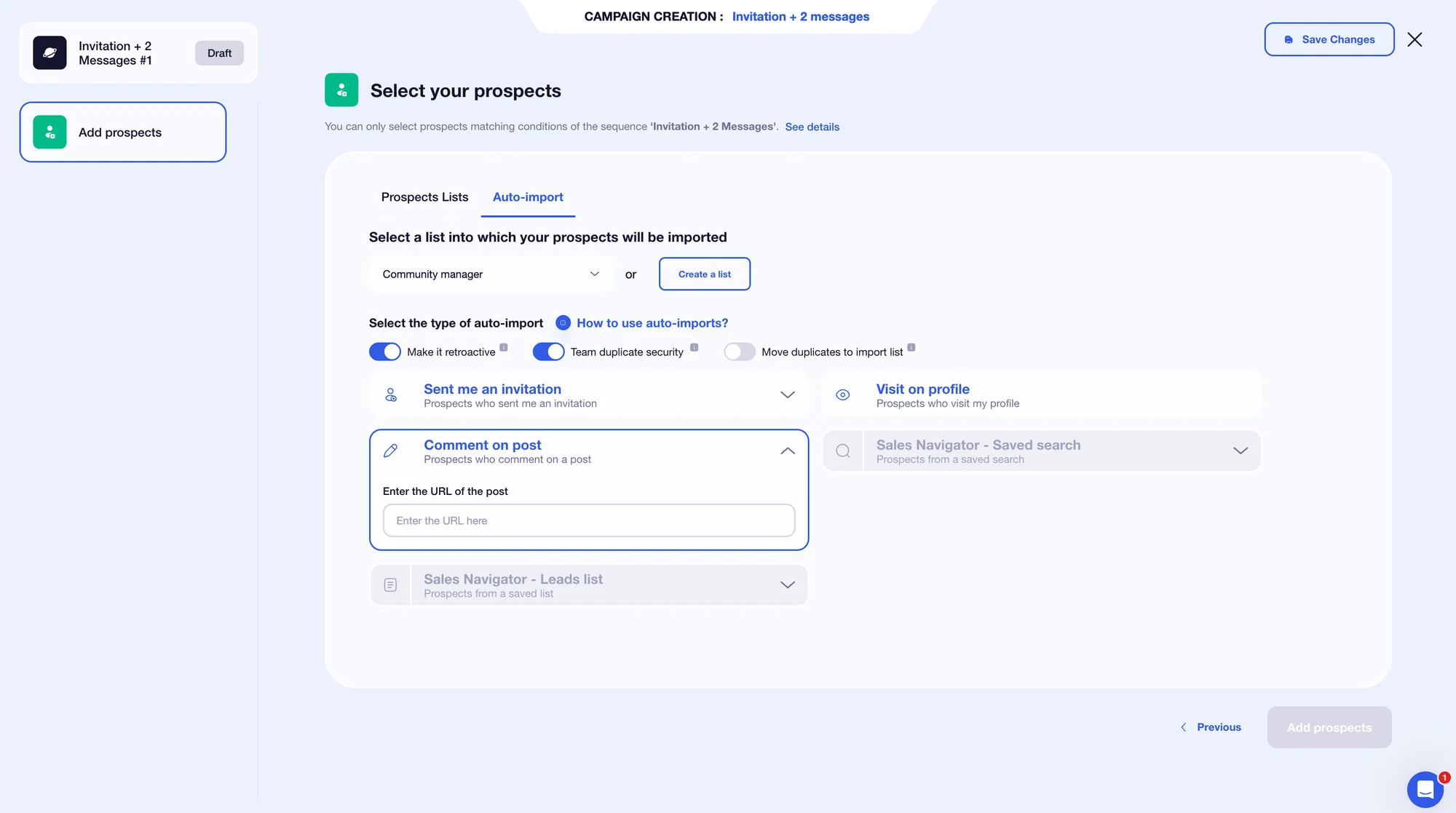
Start personalized conversations: Engage in conversation naturally, building on existing interactions rather than sending cold messages. 💬
Structure your LinkedIn prospecting: Set up a clear and progressive process without being intrusive or aggressive in your approach. 🤝
Turn visibility into concrete opportunities: Use your posts as a gateway to qualified discussions, rather than as a direct sales channel. 💼
Track clear performance indicators: Easily view response rates, conversations started, interested profiles, and opportunities generated to guide your prospecting. 📊
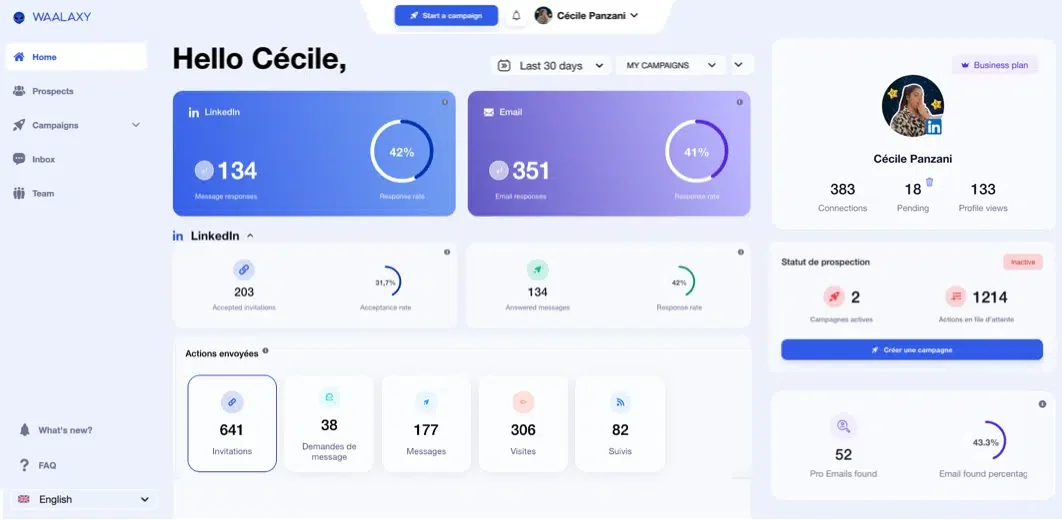
Prompts create impact, posts generate interest... and Waalaxy turns that interest into leads. 📈
Let's recap on prompt for LinkedIn post, shall we?
Posting on LinkedIn should no longer be a source of stress. With the right prompt for LinkedIn post, you gain clarity, consistency, and impact without spending hours on it. ✨
Prompts help you structure your ideas, tools like Kawaak facilitate creation and consistency, and solutions like Waalaxy allow you to turn that visibility into real business opportunities. 💼
Ultimately, it's not a question of writing talent but of method. And a good method can be learned... then optimized, post after post. 😉
Frequently asked questions
Is it allowed to use AI for LinkedIn?
Yes, using AI for Linkedin posts is completely allowed. 👍 LinkedIn does not prohibit the use of AI tools or prompts to write content. What matters is not how the post is written, but the value it brings to your audience.
However, LinkedIn penalizes content that is:
Content that is too generic.
Without a clear point of view.
Copied and pasted without personalization.
That looks like spam or aggressive sales tactics.
How can I measure whether my prompt-generated posts are performing better?
The only real answer is the numbers. 📊 Compare your prompt-generated posts to your old content using these key indicators:
Reach and impressions to see if your posts are more visible.
Engagement rate (likes, comments, shares, saves) to measure real interest.
Quality of comments: the longer and more detailed they are, the more relevant the content is.
Private messages received, often the strongest signal in B2B.
Business opportunities generated, i.e., appointments, incoming requests, collaborations, etc. 💼
Now you know everything there is to know about prompt for LinkedIn post. 🧚🏻♀️